All non-Thai nationals entering Thailand are now required to use the Thailand Digital Arrival Card (TDAC), which has completely replaced the traditional paper TM6 immigration form.
Last Updated: November 3rd, 2026 11:32 PM
View the detailed original TDAC form guideIntroduction to the Thailand Digital Arrival Card by Agents
The Thailand Digital Arrival Card (TDAC) is an online form that has replaced the paper-based TM6 arrival card. It provides convenience for all foreigners entering Thailand by air, land, or sea. The TDAC is used to submit entry information and health declaration details before arriving in the country, as authorized by the Ministry of Public Health of Thailand.
The TDAC streamlines entry procedures and enhances the overall travel experience for visitors to Thailand.
Travelers seeing the new THIM app can read our guide to see how it relates to TDAC, why TDAC still matters before arrival, and why the THIM app is not a replacement for TDAC. It is currently better understood as an alternative submission method alongside TDAC, not a full replacement for the arrival card requirement.
The Thailand Digital Arrival Card (TDAC) is an online form that has replaced the paper-based TM6 arrival card. It provides convenience for all foreigners entering Thailand by air, land, or sea. The TDAC is used to submit entry information and health declaration details before arriving in the country, as authorized by the Ministry of Public Health of Thailand.
The TDAC streamlines entry procedures and enhances the overall travel experience for visitors to Thailand.
Travelers seeing the new THIM app can read our guide to see how it relates to TDAC, why TDAC still matters before arrival, and why the THIM app is not a replacement for TDAC. It is currently better understood as an alternative submission method alongside TDAC, not a full replacement for the arrival card requirement.
Video demonstration of the Agents TDAC system, and not the official TDAC immigration system. Shows the complete TDAC application process.
| Feature | Service |
|---|---|
| Arrival <72h | Free |
| Arrival >72h | $8 (270 THB) |
| Languages | 76 |
| Approval Time | 0–5 min |
| Email Support | Available |
| Live Chat Support | Available |
| Trusted Service | |
| Reliable Uptime | |
| Form Resume Functionality | |
| Traveler Limit | Unlimited |
| TDAC Edits | Full Support |
| Resubmission Functionality | |
| Individual TDAC's | One for Each Traveler |
| eSIM Provider | |
| Insurance Policy | |
| VIP Airport Services | |
| Hotel Drop Off |
Table of Contents
- Introduction
- Who Must Submit a TDAC
- When to Submit Your TDAC
- How Does the TDAC System Work?
- Why use the Agents TDAC System
- Multiple Entries into Thailand
- TDAC Full Edit Demo
- TDAC Form Field Help and Hints
- How to Login to Your TDAC Account
- Resuming Your TDAC Draft
- Copying a Previous TDAC Application
- Benefits of the TDAC System
- Updating Your TDAC Information
- Official Thailand TDAC Related Links
- TDAC Field Overview Guide
- Countries Declared as Yellow Fever Infected Areas
- Facebook Visa Groups
- View All 1,553 TDAC Related Comments
Who Must Submit a TDAC
All foreigners entering Thailand are required to submit the Thailand Digital Arrival Card before their arrival, with the following exceptions:
- Foreigners transiting or transferring in Thailand without going through immigration control
- Foreigners entering Thailand using a Border Pass
When to Submit Your TDAC
Foreigners should submit their arrival card information within 3 days before arriving in Thailand, including the date of arrival. This allows sufficient time for processing and verification of the information provided.
While it is advisable to submit within this 3-day window, you may submit earlier. Early submissions remain in a pending state and the TDAC will be issued automatically once you are within 72 hours of your arrival date.
How Does the TDAC System Work?
The TDAC system streamlines the entry process by digitizing information collection previously done on paper. The system offers two submission options:
- Individual submission (single traveler)
- Group submission (after completing the first page, you can add more travelers to the same submission; up to 100 travelers).
You can submit for free within 3 days before your arrival date, or submit earlier anytime for a small fee (USD $8). Early submissions are automatically processed when it becomes 3 days before arrival, and your TDAC will be emailed to you upon processing.
TDAC delivery: TDACs are delivered within 3 minutes of the soonest availability window for your arrival date. They are emailed to the traveler's provided email address and are always available for download from the status page.
Why use the Agents TDAC System
Our TDAC service is built for a reliable, streamlined experience with helpful features:
- Multiple languages
- Form resumability (save and continue later)
- Unlimited travelers in one submission
- Automatic submission attempts until successful
- Reliable document delivery by email
- Always-available download from the status page
Multiple Entries into Thailand
For regular travelers with multiple trips to Thailand, the system lets you copy a previous TDAC's details to quickly start a new application. From the status page, select a completed TDAC and choose Copy details to prefill your information, then update your travel dates and any changes before submitting.
Thailand Digital Arrival Card (TDAC) — Field Overview Guide
Use this compact guide to understand every required field in the Thailand Digital Arrival Card (TDAC). Provide accurate information exactly as it appears on your official documents. Fields and options may vary depending on your passport country, travel mode, and selected visa type.
- Use English (A–Z) and digits (0–9). Avoid special symbols unless shown on your passport name.
- Dates must be valid and in chronological order (arrival before departure).
- Your selection of Travel Mode and Transport Mode controls which airport/border and number fields are required.
- If an option says "OTHERS (PLEASE SPECIFY)", describe briefly in English.
- Submission timing: Free within 3 days before arrival; submit earlier anytime for a small fee (USD $8). Early submissions are auto processed when the 3 day window begins and the TDAC is emailed to you upon processing.
Passport Details
- First NameEnter your given name exactly as printed on the passport. Do not include family/surname here.
- Middle NameIf shown on your passport, include your middle/additional given names. Leave blank if none.
- Family Name (Surname)Enter your last/family name exactly as on the passport. If you have a single name only, enter “-”.
- Passport NumberUse uppercase letters A–Z and digits 0–9 only (no spaces or symbols). Up to 10 characters.
- Passport CountrySelect the nationality/country that issued your passport. This affects visa eligibility and fees.
Personal Information
- GenderSelect the gender matching your passport for identity verification.
- Date of BirthEnter your birth date exactly as on your passport. Cannot be in the future.
- Country of ResidenceChoose where you live most of the time. Some countries require city/state selection as well.
- City/State of ResidenceIf available, select your city/state. If missing, choose “OTHERS (PLEASE SPECIFY)” and type the name in English.
- OccupationProvide a general job title in English (e.g., SOFTWARE ENGINEER, TEACHER, STUDENT, RETIRED). Text may be uppercased.
Contact Details
- EmailProvide an email you check regularly for confirmations and updates. Avoid typos (e.g., name@example.com).
- Phone Country CodeSelect the international dialing code matching the phone number you provide (e.g., +1, +66).
- Phone NumberEnter digits only where possible. If including a country code, omit the leading 0 of the local number.
Travel Plan — Arrival
- Travel ModeSelect how you will enter Thailand (e.g., AIR or LAND). This controls the required details below.If AIR is selected, Arrival Airport and (for Commercial Flight) Flight Number are required.
- Transport ModeChoose the specific transport type for your selected Travel Mode (e.g., COMMERCIAL FLIGHT).
- Arrival AirportIf arriving by AIR, select the airport of your final flight into Thailand (e.g., BKK, DMK, HKT, CNX).
- Country of BoardingSelect the country of the last leg that lands in Thailand. For land/sea, select the country you will cross from.
- Flight/Vehicle Number (into Thailand)Required for COMMERCIAL FLIGHT. Use CAPITAL letters and digits only (no spaces or hyphens), up to 7 characters.
- Arrival DateUse your scheduled arrival date or border crossing date. Must not be before today (Thailand time).
Travel Plan — Departure
- Departure Travel ModeSelect how you will leave Thailand (e.g., AIR, LAND). This controls required departure details.
- Departure Transport ModeChoose the specific departure transport type (e.g., COMMERCIAL FLIGHT). “OTHERS (PLEASE SPECIFY)” may not require a number.
- Departure AirportIf departing by AIR, select the airport in Thailand where you will depart.
- Flight/Vehicle Number (out of Thailand)For flights, use airline code + number (e.g., TG456). Digits and CAPITAL letters only, up to 7 characters.
- Departure DateYour planned exit date. Must be on or after your arrival date.
Visa and Purpose
- Arrival Visa TypeChoose Exempt Entry, Visa on Arrival (VOA), or a visa you already obtained (e.g., TR, ED, NON-B, NON-O). Eligibility depends on passport country.If TR is selected, you may be required to provide your visa number.
- Visa NumberIf you already hold a Thai visa (e.g., TR), enter the visa number using letters and digits only.
- Purpose of TravelSelect the main reason for your visit (e.g., TOURISM, BUSINESS, EDUCATION, VISIT FAMILY). Choose “OTHERS (PLEASE SPECIFY)” if not listed.
Accommodation in Thailand
- Accommodation TypeWhere you will stay (e.g., HOTEL, FRIEND/FAMILY HOME, APARTMENT). “OTHERS (PLEASE SPECIFY)” requires a short English description.
- AddressFull address of your stay. For hotels, include the hotel name on the first line and street address on the next line. English letters and numbers only. Only your initial address in Thailand is required—do not list your full itinerary.
- Province/District/Sub-district/Postal CodeUse the Address Search to auto-fill these fields. Ensure they match your actual stay location. Postal codes may default to the district code.
Health Declaration
- Countries Visited (Last 14 Days)Select every country or territory where you stayed in the 14 days before arriving. Boarding country is included automatically.If any selected country is on the Yellow Fever list, you must provide your vaccine status and proof of Yellow Fever vaccination documents. Otherwise, only the country declaration is required. See the list of Yellow Fever–affected countries
Full TDAC Form Overview
Preview the full TDAC form layout so you know what to expect before you start.
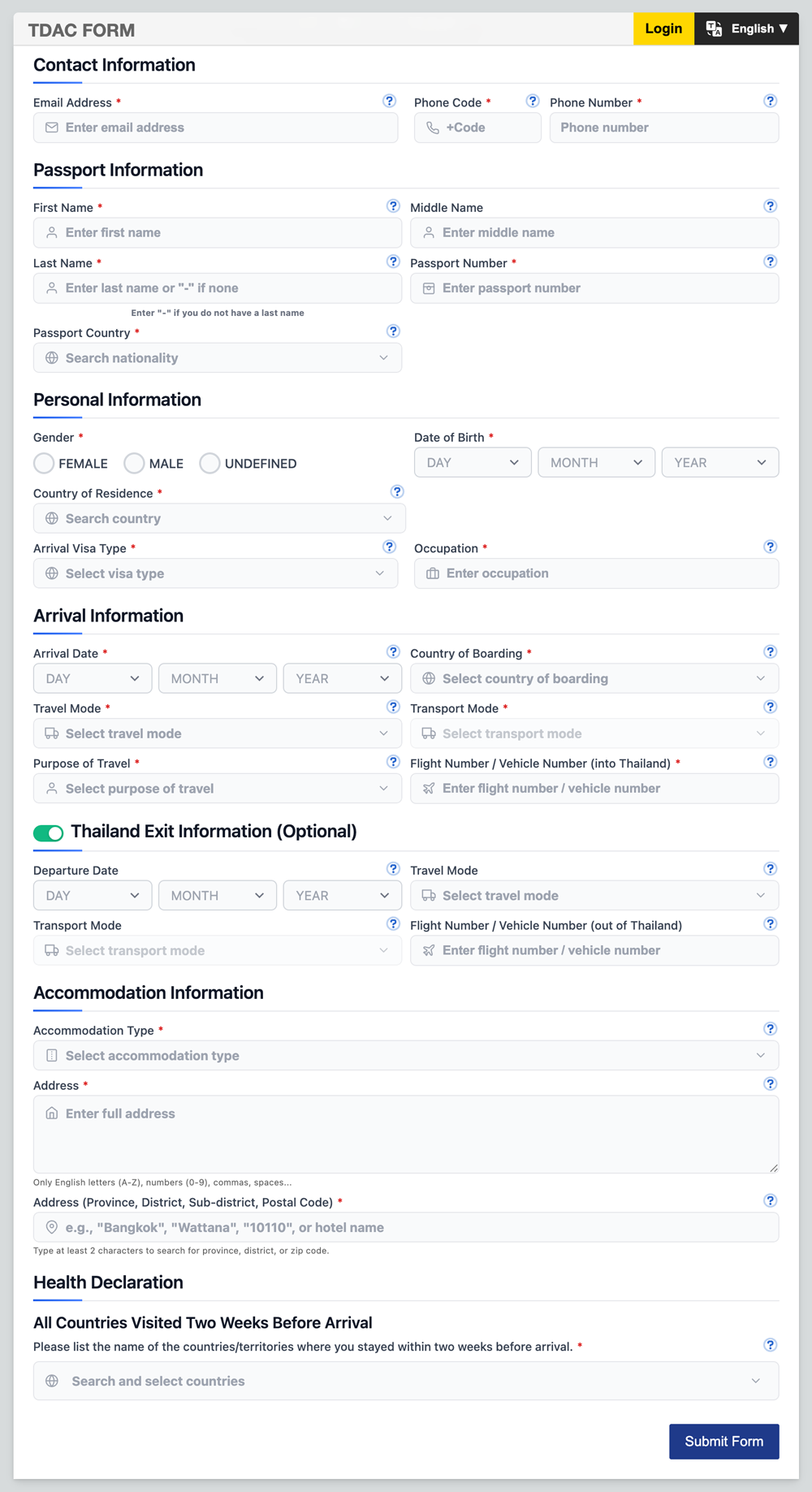
This is an image of the Agents TDAC system, and not the official TDAC immigration system. If you do not submit through the Agents TDAC system you will not see a form like this.
Benefits of the TDAC System
The TDAC system offers several advantages over the traditional paper-based TM6 form:
- Faster immigration processing upon arrival
- Reduced paperwork and administrative burden
- Ability to update information before travel
- Enhanced data accuracy and security
- Improved tracking capabilities for public health purposes
- More sustainable and environmentally friendly approach
- Integration with other systems for a smoother travel experience
Updating Your TDAC Information
The TDAC system allows you to update most of your submitted information anytime before your travel. However, certain key personal identifiers cannot be changed. If you need to modify these critical details, you may need to submit a new TDAC application.
To update your information, simply log in with your email. You will see a red EDIT button which allows you to submit TDAC edits.
Edits are only allowed if it is more than 1 day before your arrival date. Same-day edits are not permitted.
TDAC full edit demo
If an edit is made within 72 hours of your arrival, a new TDAC will be issued. If the edit is made more than 72 hours before arrival, your pending application will be updated and automatically submitted once you are within the 72-hour window.
Video demonstration of the Agents TDAC system, and not the official TDAC immigration system. Shows how to edit and update your TDAC application.
TDAC Form Field Help and Hints
Most fields in the TDAC form include an information icon (i) that you can click to get additional details and guidance. This feature is particularly helpful if you are confused about what information to enter in a specific TDAC field. Simply look for the (i) icon next to field labels and click it for more context.
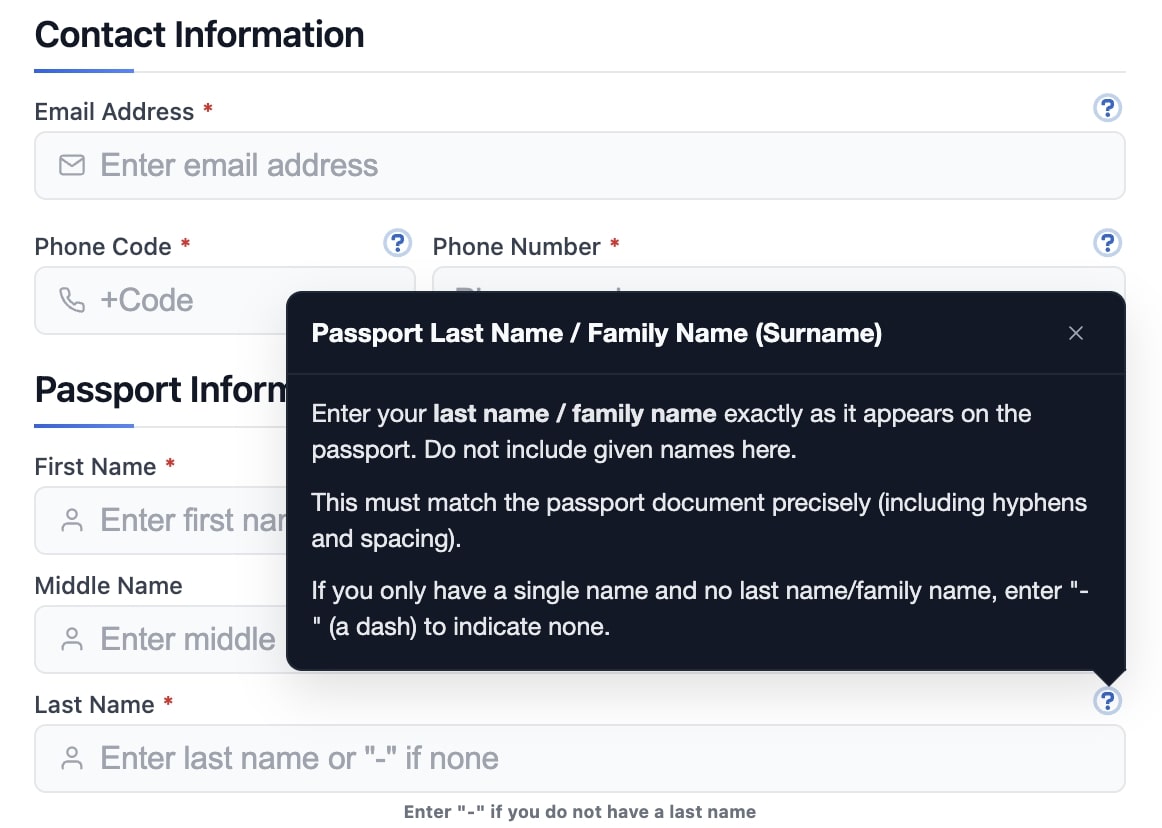
Screenshot of the Agents TDAC system, and not the official TDAC immigration system. Shows information icons (i) available in form fields for additional guidance.
How to Login to Your TDAC Account
To access your TDAC account, click the Login button located in the top right corner of the page. You will be asked to enter the email address that you used to draft or submit your TDAC application. After entering your email, you will need to verify it through a one-time password (OTP) that will be sent to your email address.
Once your email is verified, you will be presented with several options: load an existing draft to continue working on it, copy details from a previous submission to create a new application, or view the status page of an already submitted TDAC to track its progress.
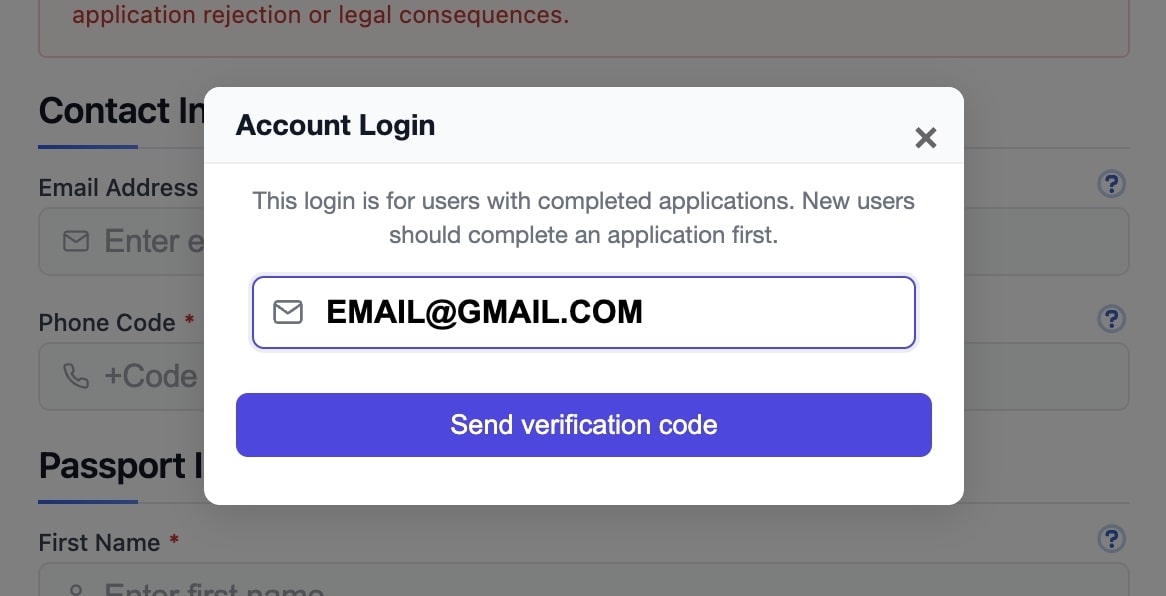
Screenshot of the Agents TDAC system, and not the official TDAC immigration system. Shows the login process with email verification and access options.
Resuming Your TDAC Draft
Once you verify your email and pass the login screen, you may see any draft applications associated with your verified email address. This feature allows you to load an unsubmitted draft TDAC that you can complete and submit later at your convenience.
Drafts are automatically saved while you are completing the form, ensuring that your progress is never lost. This autosave functionality makes it easy to switch to another device, take a break, or simply complete the TDAC application at your own pace without worrying about losing your information.
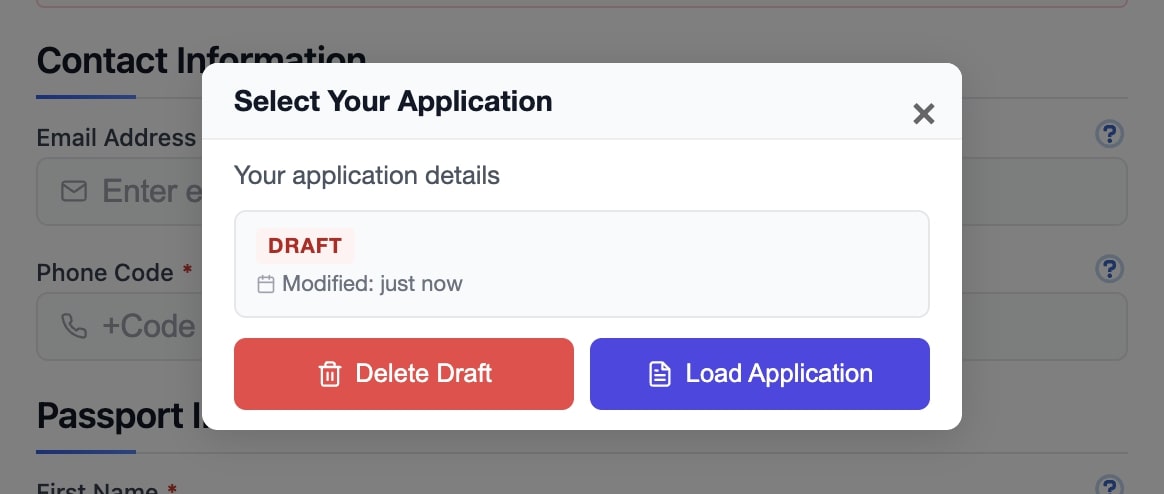
Screenshot of the Agents TDAC system, and not the official TDAC immigration system. Shows how to resume a saved draft with automatic progress preservation.
Copying a Previous TDAC Application
If you have already submitted a TDAC application in the past through the Agents system, you can take advantage of our convenient copy feature. After logging in with your verified email, you will be presented with the option to copy a previous application.
This copy function will automatically prefill the entire new TDAC form with the general details from your previous submission, allowing you to quickly create and submit a new application for your upcoming trip. You can then update any changed information such as travel dates, accommodation details, or other trip-specific information before submitting.
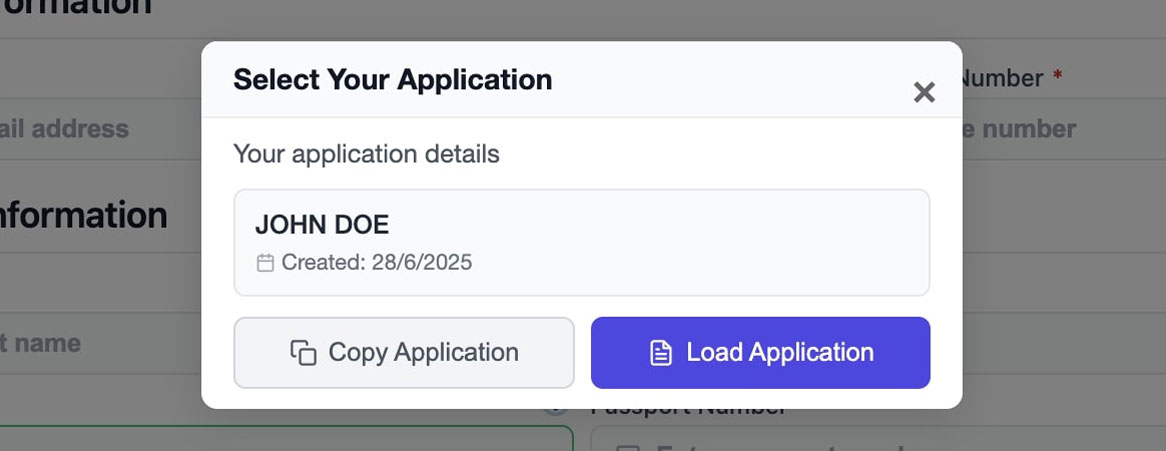
Screenshot of the Agents TDAC system, and not the official TDAC immigration system. Shows the copy feature for reusing previous application details.
Countries Declared as Yellow Fever Infected Areas
Travelers who have travelled from or through these countries may be required to present an International Health Certificate proving Yellow Fever vaccination. Keep your vaccination certificate ready if applicable.
Africa
Angola, Benin, Burkina Faso, Burundi, Cameroon, Central African Republic, Chad, Congo, Congo Republic, Cote d'Ivore, Equatorial Guinea, Ethiopia, Gabon, Gambia, Ghana, Guinea-Bissau, Guinea, Kenya, Liberia, Mali, Mauritania, Niger, Nigeria, Rwanda, Sao Tome & Principe, Senegal, Sierra Leone, Somalia, Sudan, Tanzania, Togo, Uganda
South America
Argentina, Bolivia, Brazil, Colombia, Ecuador, French-Guiana, Guyana, Paraguay, Peru, Suriname, Venezuela
Central America & Caribbean
Panama, Trinidad and Tobago
Official Thailand TDAC Related Links
For more information and to submit your Thailand Digital Arrival Card, please visit the following official link:
- Official TDAC Website - Thailand Immigration Bureau
- International Health Certificate Requirements - Ministry of Foreign Affairs
- 04/04/2025 - Thai Travel Thailand - TATKB
- 04/04/2025 - TDAC Country of Residence Update - TAT News
- 31/03/2025 - Thailand Immigration Bureau Facebook Post
- 05/03/2025 - Ministry Details on TDAC Implementation
- 24/02/2025 - MNRE Announcement on TDAC
- 03/02/2025 - Thailand to Start Online TM6 on 1 May 2025
- 03/02/2025 - Public Relations Department Announcement
- 03/02/2025 - Chiang Mai Airport Customs Announcement
- 31/01/2025 - Thailand Government Announcement
Facebook Visa Groups
Recent discussions
Ask Thailand CommunityThese topics are pulled server-side from the ASK community so travelers can quickly see the latest THIM- and TDAC-related discussion around the rollout.
Comments about Thailand Digital Arrival Card (TDAC)
Ask questions and get help with Thailand Digital Arrival Card (TDAC).
Comments (1,553)
Click comment and we will ask for your email, then OTP, then name.
Submitted from the taxi to the airport, about four hours before departure, landing this evening. Card was in the mail before we reached the terminal. I was ready to be the warning story.
Don't make that the plan. It worked because the window was already open and the site was up. Do it the day before and be bored instead.
Agreed. I am the bad example that got away with it. PDF is saved.
takes only a few mins for approval... you could have done it when you arrived and waalked to immigraiton
True, it’s quick if the system’s up, but I’d rather not risk any glitches while standing in line. Doing it before arrival feels way less stressful to me.
For the next person doing this tired: passport name, arrival date in Thailand, first hotel, and a PDF you can open without wifi. Everything else in the group chat is optional noise.
And each person their own card. That was the one we got wrong last year.
Yes. One passport, one card. I should have put that first.
Is a photo of the PDF on my camera roll enough, or do they scan a barcode from the official file? I don't want to depend on airport wifi to open a link.
Save the actual PDF. A photo of it is a backup. The officer mostly wants the passport, and you want the file if they ask.
PDF is offline in files. Photo is the backup. Wifi can do what it wants.
Lands 1:40am. I put the date as the day the flight left, because in my head the trip started then. That was the day before. Changed it to the day I actually arrive.
After midnight in Thailand is the next date. The departure morning is a different piece of paper.
Card says the arrival date. I checked it against the ticket's landing time, not the takeoff.
Is the PDF password protected? It opened straight away and now I trust it less, which is not reasonable, but here we are.
It isn't password protected. If your name and the date are right, that is the check. A password would just be another thing to lose.
Name and date are right. I will stop inventing problems.
Thim app not working, what do I do?
Yeah, the THIM app can be glitchy sometimes. I just ended up filling out the TDAC arrival card online before my flight instead, worked fine for me. Maybe try that if the app keeps acting up?
Thank you, that worked, got my PDF
Nice! Glad the TDAC card did the trick for you. Hopefully the THIM app gets more stable soon.
arrived in thailand with the TDAC, thank you
Sweet, welcome to Thailand! Hope you’re settling in well, did you find the TDAC process pretty smooth overall?
Cruise into Laem Chabang. The form's sea option exists. The ship's agent says they 'handle arrival'. I don't know if that means they file my TDAC or they mean the ship's papers.
Ask them whose name is on the card. If they cannot show you your own PDF, file it yourself and pick sea.
They meant the ship's papers. I filed mine. Sea, not air. PDF in the mail.
Card was issued, then I changed hotels again the morning of the flight. Second new PDF arrived. I now have three files named almost the same. The latest timestamp is the one in my pocket.
Rename it. 'FINAL' is a lie. Put the hotel name in the filename.
Renamed with the hotel. The other two are in a folder called old, which is where they can stay.
Four of us. Mine is fine. My brother's has his first and last name swapped. He says the booth will understand. I say the booth will not be in the mood.
Fix it before you fly if the window is still open. 'They will understand' is not a document.
He fixed it. New PDF. I have stopped managing him, which will last until the next form.
We thought my card covered my husband because we booked together. It doesn't. He needs his own before Friday. Writing it here because the booking email made us feel like one person.
Two passports, two cards. The hotel booking can be the same address on both. That is the only part you share.
A TDAC is per traveler. A shared booking does not put a second person on the first card. File his passport on its own card before arrival.
His PDF arrived. Same hotel, his name. We are two people again.
Airline moved me from the 9th to the 11th. Card was already issued for the 9th. I changed the date. New PDF says the 11th. I assume the 9th one is dead.
Use the one that matches the flight you will actually be on. Delete the other from your photos so you don't offer it out of habit.
Deleted. The 11th is the only file on the phone.
Friend says you can show up and do the TDAC at a desk in the airport if you forgot. I would like that to be a backup and not the plan.
Backup, not the plan. File before you fly. A desk, if you find one, is how you spend the time you thought you had for the toilet.
Submit the TDAC before arrival, inside the 3 days if you want it issued and free on the official site. Do not leave it for the immigration hall.
Three hotels. The form took the first and ignored the rest. Bangkok, then Krabi. I put Bangkok. Tell me that is the whole trick.
First place you sleep after arrival. Krabi is not a second TDAC. Keep the booking if you enjoy being prepared.
Bangkok is on the card. Krabi is in my email. I can live with that split.
Flight number is TG421 on the ticket and I typed TG412. One digit. Worth an edit, or will they see the airline and shrug?
Edit it. It's one digit to you and the wrong plane to anyone who looks.
Edited. TG421. I read it off the ticket this time, not out of my head.
THIM would not scan the passport. I did the TDAC website instead. A comment somewhere said that is now the wrong system. I have a PDF. I would like to stop reading comments.
The website is the arrival card. The app is another door to the same card. A PDF with your name is the result. Stop reading.
The TDAC website is still a valid way to file. THIM does not replace it. If you have the card, you have done the arrival card. You do not also need the app.
Phone died after I saved the PDF to the phone and not to mail. No second copy. Status page still shows it. I am downloading again onto a phone that has charge.
Mail a copy to yourself when you have it. A phone is a bad only-copy.
In the mail, on the phone, and on my husband's phone. Three is enough.
Transit in Bangkok, six hours, not entering. Do I need a TDAC to sit in the terminal, or only if I go through immigration?
If you don't enter, you don't do the arrival card. The moment the plan becomes 'I'll clear and eat in the city', you need one.
Staying airside. No card. If the flight dies and they push us in, I'll do it on the spot and complain later.
I am flying from delhi to Chiang rai and same route back. My flight is connecting in bangkok. What should I fill in arrival and departure detail. Chiang rai or bangkok?
I filled in Bangkok as arrival/departure since that’s where you actually enter and leave Thailand, even if your final stop is Chiang Rai. That worked fine for me!
Purpose of visit. Holiday. I am also visiting a friend. I picked tourism. I did not write a paragraph about the friend.
Tourism covers a friend. The paragraph is how you talk yourself into the wrong box.
Tourism stayed. Friend knows I'm coming. The form does not need the story.
Passport has a middle name. I used the name I go by. The PDF looks neat and it is not the passport. How much does the booth care?
They care. Match the passport, middle name included. Edit it now if you are still inside the window. A neat wrong name is still wrong.
Edited. New PDF has the middle name. I liked the short one better. The passport does not.
We are not a government website or resource. We strive to provide accurate information and offer assistance to travelers.