Kabeh warga non-Thai sing mlebu Thailand saiki diwajibkan nggunakake Kartu Kedatangan Digital Thailand (TDAC), sing wis sepenuhnya ngganti formulir imigrasi kertas TM6 tradisional.
Pembaruan Terakhir: November 3rd, 2026 11:32 PM
Deleng pandhuan rinci formulir TDAC asliPambuka kanggo Kartu Kedatangan Digital Thailand dening Agen
Kartu Kedatangan Digital Thailand (TDAC) yaiku formulir online sing wis ngganti kartu kedatangan berbasis kertas TM6. Iki menehi kenyamanan kanggo kabeh wong asing sing mlebu Thailand liwat udara, darat, utawa laut. TDAC digunakake kanggo ngirim informasi mlebu lan rincian deklarasi kesehatan sadurunge teka ing negara, kaya sing disetujoni dening Kementerian Kesehatan Umum Thailand.
TDAC nyederhanakake prosedur mlebu lan nambah pengalaman lelungan sakabèhé kanggo pengunjung ing Thailand.
Lelungan sing weruh sing anyar THIM aplikasi bisa maca pandhuan kita kanggo mangerteni kepiye hubungane karo TDAC, kenapa TDAC isih penting sakdurunge rawuh, lan kenapa aplikasi THIM dudu panggantos TDAC. Saiki luwih becik dianggep minangka cara pangumpulan alternatif bebarengan karo TDAC, dudu panggantos penuh kanggo syarat kertu teka (arrival card).
Video demonstrasi saka sistem Agents TDAC, lan dudu sistem imigrasi TDAC resmi. Nuduhake proses aplikasi TDAC lengkap.
| Fitur | Layanan |
|---|---|
| Kedatangan <72jam | Gratis |
| Kedatangan >72jam | $8 (270 THB) |
| Basa | 76 |
| Wektu Persetujuan | 0–5 min |
| Dukungan Email | Kasedhiya |
| Layanan Obrolan Langsung | Kasedhiya |
| Layanan Terpercaya | |
| Wektu Uptime Sing Terpercaya | |
| Fungsi Resume Formulir | |
| Watesan Lelungan | Tanpa Wates |
| Suntingan TDAC | Dukungan Penuh |
| Fungsi Pengajuan Ulang | |
| TDAC individu | Siji kanggo saben pelancong |
| Penyedia eSIM | |
| Polis Asuransi | |
| Layanan VIP Bandara | |
| Antar menyang Hotel |
Daftar Isi
- Pambuka
- Sapa sing kudu Ngirim TDAC
- Kapan kanggo Ngirim TDAC sampeyan
- Kepiye Cara Kerja Sistem TDAC?
- Napa nggunakake Sistem TDAC Agen
- Mlebu kaping pirang-pirang menyang Thailand
- Demo Sunting Lengkap TDAC
- Bantuan lan Tips Kolom Form TDAC
- Carane Mlebu menyang Akun TDAC Sampeyan
- Nerusake Draf TDAC Sampeyan
- Nyalin Aplikasi TDAC Sadurunge
- Manfaat Sistem TDAC
- Memperbarui Informasi TDAC Anda
- Tautan Terkait TDAC Thailand Resmi
- Pandhuan Ringkes Kolom TDAC
- Negara-negara sing diumumake minangka Wilayah Terinfeksi Demam Kuning
- Grup Visa Facebook
- Deleng Kabeh Komentar TDAC sing Ana 1,553
Sapa sing kudu Ngirim TDAC
Kabeh wong asing sing mlebu Thailand kudu ngirim Kartu Kedatangan Digital Thailand sadurunge tekan, kanthi pengecualian ing ngisor iki:
- Warga asing sing transit utawa transfer ing Thailand tanpa liwat kontrol imigrasi
- Warga asing mlebu Thailand nggunakake Pas Perbatasan
Kapan kanggo Ngirim TDAC sampeyan
Warga asing kudu ngirim informasi kartu kedatangan sajrone 3 dina sadurunge tekan Thailand, kalebu tanggal kedatangan. Iki menehi wektu sing cukup kanggo proses lan verifikasi informasi sing diwenehake.
Sanadyan dianjurake ngirim sajrone jendhela 3 dina iki, sampeyan bisa ngirim luwih awal. Pengiriman awal bakal tetep ing status nunggu lan TDAC bakal diterbitake otomatis nalika wis kurang saka 72 jam nganti tanggal kedatangan.
Kepiye Cara Kerja Sistem TDAC?
Sistem TDAC nyepetake proses mlebu kanthi ngedigitalisasi pengumpulan informasi sing sadurunge ditindakake nganggo kertas. Sistem iki nawakake loro opsi pengajuan:
- Pengajuan individu (pelancong tunggal)
- Pengajuan kelompok (sawise ngrampungake kaca pisanan, sampeyan bisa nambah pelancong liyane menyang pengajuan sing padha; nganti 100 pelancong).
Sampeyan bisa ngirim gratis sajrone 3 dina sadurunge tanggal kedatangan, utawa ngirim luwih awal kapan wae kanthi biaya cilik (USD $8). Pengiriman awal bakal diproses otomatis nalika wis tekan 3 dina sadurunge kedatangan, lan TDAC sampeyan bakal dikirim menyang email sawisé diproses.
Pengiriman TDAC: TDAC bakal dikirim sajrone 3 menit saka jendela kasedhiyan paling awal kanggo tanggal teka sampeyan. TDAC bakal dikirim menyang alamat email sing diwenehake pelancong lan mesthi bisa diunduh saka kaca status.
Napa nggunakake Sistem TDAC Agen
Layanan TDAC kita dirancang kanggo pengalaman sing bisa dipercaya lan lancar kanthi fitur-fitur sing migunani:
- Pirang-pirang basa
- Formulir bisa diterusake (simpen lan terusake mengko)
- Jumlah pelancong tanpa wates ing siji pengajuan
- Nyoba pangiriman otomatis nganti kasil
- Pengiriman dokumen sing bisa dipercaya liwat email
- Undhuhan sing tansah kasedhiya saka kaca status
Mlebu kaping pirang-pirang menyang Thailand
Kanggo para lelungan reguler sing kerep menyang Thailand, sistem ngidini sampeyan nyalin rincian TDAC sadurunge kanggo miwiti aplikasi anyar kanthi cepet. Saka kaca status, pilih TDAC sing wis rampung lan pilih "Salin rincian" kanggo ngisi informasi sampeyan kanthi otomatis, banjur nganyari tanggal lelungan lan owah-owahan sadurunge dikirim.
Kartu Kedatangan Digital Thailand (TDAC) — Pandhuan Ringkes Kolom
Gunakake pandhuan ringkes iki kanggo mangerteni saben kolom sing dibutuhake ing Thailand Digital Arrival Card (TDAC). Wenehake informasi sing akurat persis kaya sing ana ing dokumen resmi sampeyan. Kolom lan pilihan bisa béda gumantung saka negara paspor, mode perjalanan, lan jinis visa sing dipilih.
- Gunakake aksara Inggris (A–Z) lan angka (0–9). Aja nganggo simbol khusus kajaba katon ing jeneng ing paspor sampeyan.
- Tanggal kudu sah lan miturut urutan kronologis (teka sadurunge budhal).
- Pilihan Mode Perjalanan lan Mode Transportasi sampeyan nemtokake bandara/wates lan kolom nomer sing dibutuhake.
- Yen ana pilihan sing nulis "OTHERS (PLEASE SPECIFY)", nerangake kanthi ringkes ing basa Inggris.
- Wektu pengajuan: Gratis ing jero 3 dina sadurunge teka; bisa diajokake luwih awal kapan wae kanthi biaya cilik (USD $8). Pengajuan awal bakal diproses otomatis nalika jendela 3 dina diwiwiti lan TDAC dikirim menyang email sampeyan sawisé diproses.
Rincian paspor
- Jeneng NgarepLebokake jeneng ngarep kanthi persis kaya tercetak ing paspor. Aja kalebu jeneng kulawarga/mburi ing kene.
- Nama TengahYen ana ing paspor, cantumake jeneng tengah/jeneng tambahan. Kosongake yen ora ana.
- Jeneng Kulawarga (Surname)Lebokake jeneng mburi/keluarga persis kaya ana ing paspor. Yen mung nduwèni siji jeneng, lebokake “-”.
- Nomor PasporGunakake mung aksara kapital A–Z lan angka 0–9 (ora ana spasi utawa simbol). Maksimal 10 karakter.
- Negara Penerbit PasporPilih kebangsaan/negara sing nerbitake paspor sampeyan. Iki bakal mengaruhi kelayakan visa lan biaya.
Informasi Pribadi
- JenderPilih jinis kelamin sing cocog karo paspor sampeyan kanggo verifikasi identitas.
- Tanggal LahirLebokake tanggal lair kanthi persis kaya ana ing paspor. Ora kena ana ing mangsa ngarep.
- Negara PanggonanPilih panggonan sing biasané sampeyan manggon. Sawetara negara uga mbutuhake pilihan kutha/provinsi.
- Kota/Provinsi PanggonanYen kasedhiya, pilih kutha/provinsi sampeyan. Yen ora ana, pilih “OTHERS (PLEASE SPECIFY)” lan ketik jeneng ing basa Inggris.
- PekerjaanWenehake jabatan umum ing basa Inggris (umpamane, SOFTWARE ENGINEER, TEACHER, STUDENT, RETIRED). Teks bisa nganggo huruf gedhe.
Rincian Kontak
- EmailLebokake alamat email sing sampeyan priksa sacara rutin kanggo konfirmasi lan kabar. Aja nganti salah ngetik (umpamane, name@example.com).
- Kode Negara TeleponPilih kode dial internasional sing cocog karo nomer telpon sing sampeyan wenehake (umpamane, +1, +66).
- Nomer telponLebokake mung digit yen bisa. Yen nambah kode negara, tinggalake 0 ing ngarep nomer lokal.
Rencana Perjalanan — Kedatangan
- Mode PerjalananPilih cara mlebu Thailand (umpamane, UDARA utawa DARAT). Iki nemtokake rincian sing dibutuhake ing ngisor iki.Yen milih AIR, Bandara Kedatangan lan (kanggo Penerbangan Komersial) Nomor Penerbangan wajib diisi.
- Mode TransportasiPilih jinis transportasi sing spesifik kanggo Mode Lelungan sing sampeyan pilih (contone: COMMERCIAL FLIGHT).
- Bandara KedatanganYen teka nganggo AIR, pilih bandara saka penerbangan pungkasan sing mlebu Thailand (contone: BKK, DMK, HKT, CNX).
- Negara Panggon MunggahPilih negara saka etape pungkasan sing tekan Thailand. Kanggo mlebu liwat darat/samudra, pilih negara sing bakal sampeyan lintasi.
- Nomor Penerbangan/Kendaraan (masuk Thailand)Diperlukan kanggo PENERBANGAN KOMERSIAL. Gunakake huruf GEDHE lan angka wae (tanpa spasi utawa tanda hubung), maksimal 7 karakter.
- Tanggal kedatanganGunakake tanggal kedatangan sing wis dijadwalake utawa tanggal nyabrang wates. Ora kena luwih awal saka dina iki (waktu Thailand).
Rencana Perjalanan — Keberangkatan
- Mode Lelungan BudhalPilih cara sampeyan ninggalake Thailand (umpamane, UDARA, DARAT). Iki nemtokake rincian keberangkatan sing dibutuhake.
- Mode Transportasi BudhalPilih jinis transportasi mangkat sing spesifik (contone: COMMERCIAL FLIGHT). “OTHERS (PLEASE SPECIFY)” bisa uga ora mbutuhake nomer.
- Bandara BudhalYen mangkat nganggo AIR, pilih bandara ing Thailand saka ngendi sampeyan bakal mangkat.
- Nomor Penerbangan/Kendaraan (metu saka Thailand)Kanggo penerbangan, gunakake kode maskapai + nomer (contone: TG456). Mung digit lan huruf HURUF BESAR (CAPITAL) sing diijini, maksimal 7 karakter.
- Tanggal BudalTanggal metu sing direncanakake. Kudu ing utawa sawise tanggal kedatangan sampeyan.
Visa lan Tujuan
- Jinis Visa TekanPilih Bebas Masuk, Visa on Arrival (VOA), utawa visa sing wis sampeyan entuk (contone: TR, ED, NON-B, NON-O). Kelayakan gumantung marang negara sing nang paspor.Yen dipilih TR, sampeyan bisa diminta nyedhiyakake nomer visa.
- Nomor VisaYen sampeyan wis nduweni visa Thailand (contone, TR), lebokake nomer visa nggunakake huruf lan angka wae.
- Tujuan PerjalananPilih alesan utama kunjungan sampeyan (umpamane, TOURISM, BUSINESS, EDUCATION, VISIT FAMILY). Pilih “OTHERS (PLEASE SPECIFY)” yen ora ana ing dhaptar.
Akomodasi ing Thailand
- Jinis akomodasiPanggonan nginep sampeyan (contone: HOTEL, OMAH KONCO/KELUARGA, APARTEMEN). “LAIN-LAIN (MOHON SEBUTKE)” mbutuhake katrangan cekak ing basa Inggris.
- AlamatAlamat lengkap panggonan nginep. Kanggo hotel, lebokna jeneng hotel ing garis kapisan lan alamat dalan ing garis sabanjure. Mung huruf lan angka basa Inggris. Mung alamat awal sampeyan ing Thailand sing dibutuhake—aja nyantumake rencana perjalanan lengkap.
- Provinsi/Kabupaten/Kecamatan/Kode PosGunakake Pencarian Alamat kanggo ngisi otomatis kolom-kolom iki. Pastèkake padha karo panggonan nginep saktenane. Kode pos bisa diset otomatis dadi kode kecamatan.
Deklarasi Kesehatan
- Negara sing Didatengi (14 Dina Kepungkur)Pilih saben negara utawa wilayah sing sampeyan tinggal ing 14 dina sadurunge teka. Negara keberangkatan kalebu kanthi otomatis.Yen ana negara sing dipilih ana ing dhaptar Demam Kuning, sampeyan kudu nyedhiyakake status vaksinasi lan bukti dokumen vaksin Demam Kuning. Yen ora, cukup nyatakake negara wae. Delengen dhaptar negara sing kena Demam Kuning
Ringkesan Lengkap Formulir TDAC
Pratinjau tata letak formulir TDAC lengkap supaya sampeyan ngerti apa sing diarepake sadurunge miwiti.
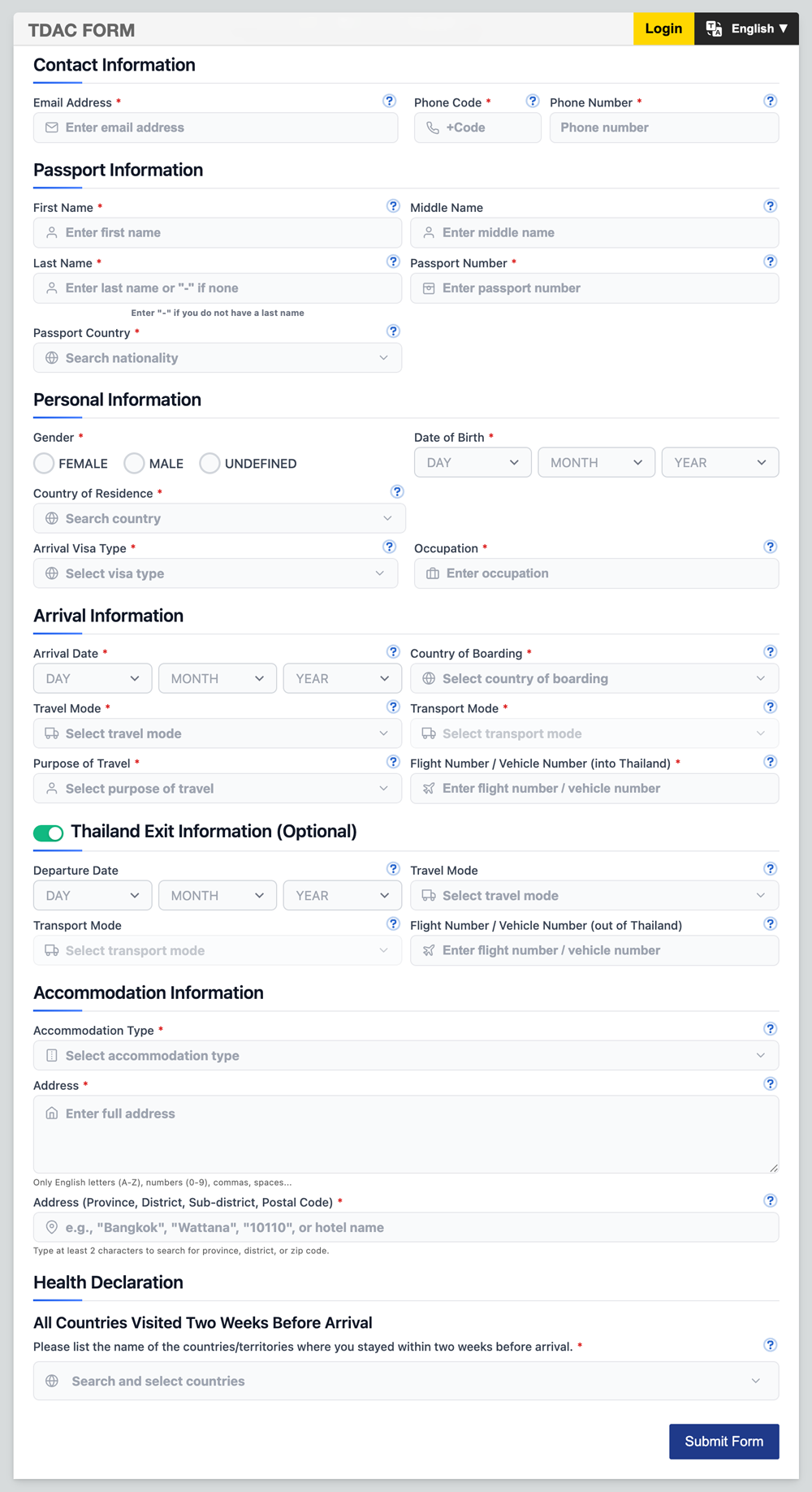
Iki gambar sistem Agen TDAC, lan dudu sistem imigrasi TDAC resmi. Yen sampeyan ora ngirim liwat sistem Agen TDAC, sampeyan ora bakal ndeleng formulir kaya iki.
Manfaat Sistem TDAC
Sistem TDAC nawakake sawetara kauntungan tinimbang formulir TM6 berbasis kertas tradisional:
- Proses imigrasi luwih cepet nalika tekan
- Dokumen lan beban administratif sing dikurangi
- Kemampuan kanggo nganyari informasi sadurunge perjalanan
- Akurasi data lan keamanan sing luwih apik
- Kemampuan pelacakan sing luwih apik kanggo tujuan kesehatan masyarakat
- Pendekatan sing luwih lestari lan ramah lingkungan
- Integrasi karo sistem liyane kanggo pengalaman lelungan sing luwih lancar
Memperbarui Informasi TDAC Anda
Sistem TDAC ngidini sampeyan nganyari sebagian besar informasi sing wis diajokake kapan wae sadurunge perjalanan. Nanging, sawetara identifikasi pribadi penting ora bisa diganti. Yen sampeyan perlu ngowahi rincian kritis iki, sampeyan bisa uga kudu ngirim aplikasi TDAC anyar.
Kanggo nganyari informasi sampeyan, cukup mlebu nganggo email. Sampeyan bakal weruh tombol EDIT abang sing ngidini sampeyan ngirim suntingan TDAC.
Suntingan mung diijini yen luwih saka 1 dina sadurunge tanggal teka sampeyan. Suntingan ing dina sing padha ora diijini.
Demo sunting lengkap TDAC
Yen suntingan digawe ing jero 72 jam sadurunge rawuh panjenengan, TDAC anyar bakal diterbitake. Yen suntingan digawe luwih saka 72 jam sadurunge rawuh, aplikasi panjenengan sing isih ana ing proses bakal dianyari lan bakal dikirim kanthi otomatis nalika panjenengan mlebu ing jendela 72 jam.
Video demonstrasi saka sistem Agents TDAC, lan dudu sistem imigrasi TDAC resmi. Nuduhake cara ngowahi lan nganyari aplikasi TDAC sampeyan.
Bantuan lan Tips Kolom Form TDAC
Kebanyakan kolom ing formulir TDAC ngemot ikon informasi (i) sing bisa sampeyan klik kanggo entuk rincian lan pandhuan tambahan. Fitur iki migunani banget yen sampeyan bingung babagan informasi apa sing kudu dilebokake ing kolom TDAC tartamtu. Cukup goleki ikon (i) ing jejere label kolom lan klik kanggo konteks luwih lengkap.
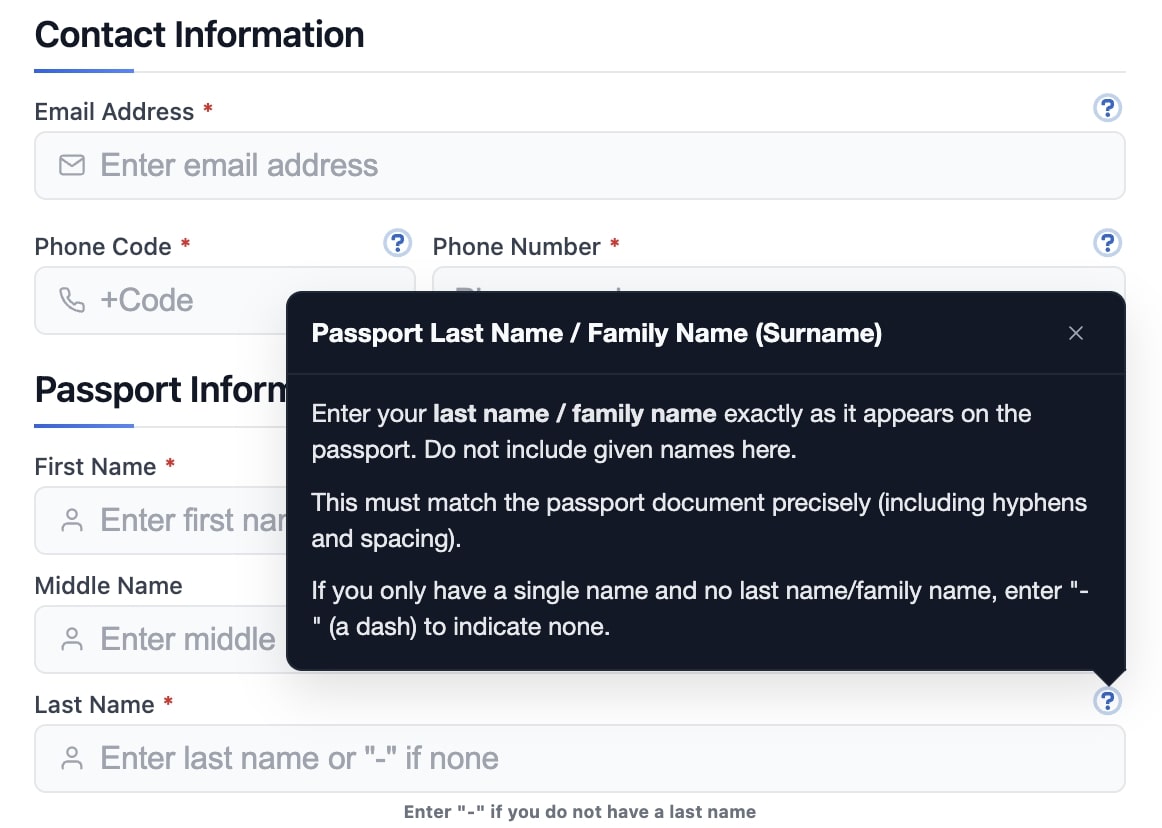
Tangkapan layar saka sistem Agents TDAC, lan dudu sistem imigrasi TDAC resmi. Nuduhake ikon informasi (i) sing kasedhiya ing lapangan formulir kanggo pandhuan tambahan.
Carane Mlebu menyang Akun TDAC Sampeyan
Kanggo ngakses akun TDAC sampeyan, klik tombol Login sing ana ing pojok ndhuwur tengen kaca. Sampeyan bakal dijaluk ngetik alamat email sing sampeyan gunakake kanggo nrancang utawa ngirim aplikasi TDAC sampeyan. Sawise ngetik email, sampeyan kudu verifikasi liwat sandhi siji-wektu (OTP) sing bakal dikirim menyang alamat email sampeyan.
Sawise email sampeyan diverifikasi, sampeyan bakal diwenehi sawetara pilihan: muat draf sing ana kanggo nerusake kerjané, nyalin rincian saka pengiriman sadurunge kanggo nggawe aplikasi anyar, utawa ndeleng kaca status saka TDAC sing wis dikirim kanggo ngawasi kemajuane.
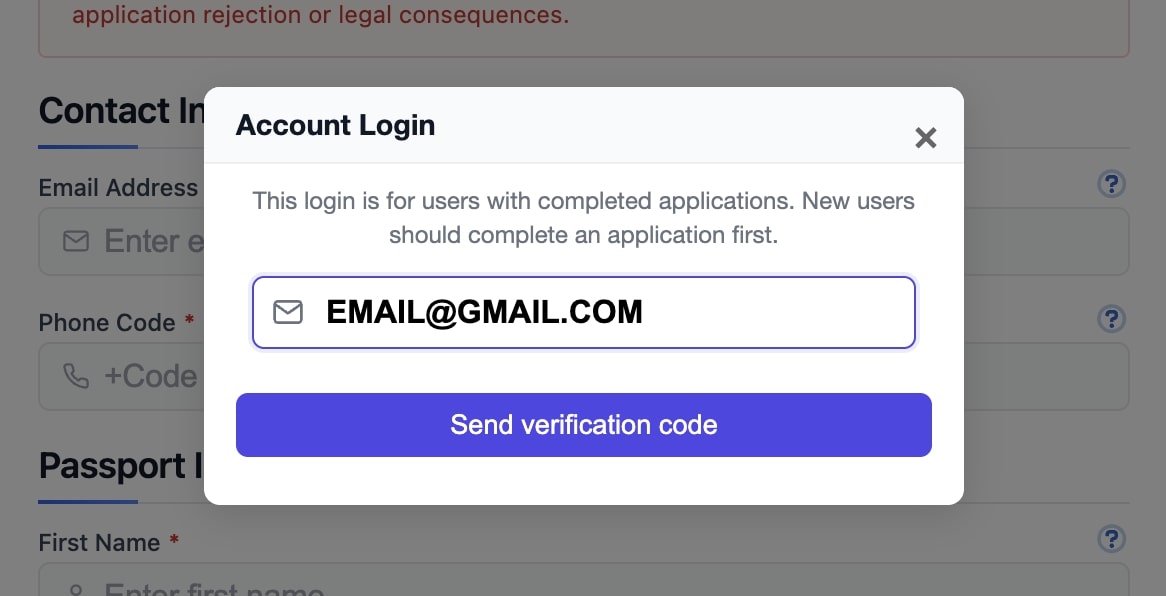
Tangkapan layar saka sistem Agents TDAC, lan dudu sistem imigrasi TDAC resmi. Nuduhake proses mlebu kanthi verifikasi email lan pilihan akses.
Nerusake Draf TDAC Sampeyan
Sawise sampeyan verifikasi email lan liwat layar mlebu, sampeyan bisa ndeleng draf aplikasi sing gegandhengan karo alamat email sing wis diverifikasi. Fitur iki ngidini sampeyan mbukak draf TDAC sing durung dikirim sing bisa sampeyan rampungake lan kirim mengko miturut kenyamanan sampeyan.
Draf disimpen sacara otomatis nalika sampeyan ngisi formulir, supaya kemajuan sampeyan ora bakal ilang. Fitur simpen otomatis iki nggawe gampang kanggo pindhah menyang piranti liyane, ngaso, utawa mung ngrampungake aplikasi TDAC miturut irama sampeyan tanpa kuwatir bab kelangan informasi.
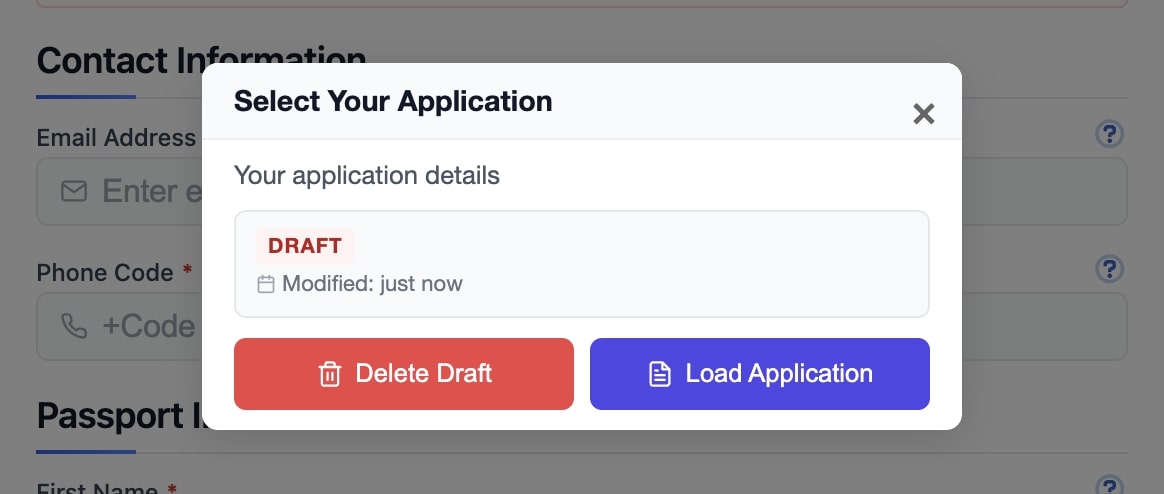
Tangkapan layar saka sistem Agents TDAC, lan dudu sistem imigrasi TDAC resmi. Nuduhake cara nerusake draf sing wis disimpen kanthi panyimpenan otomatis supaya kemajuan ora ilang.
Nyalin Aplikasi TDAC Sadurunge
Yen sampeyan wis tau ngirim aplikasi TDAC sadurunge liwat sistem Agents, sampeyan bisa nggunakake fitur salin sing trep. Sawise mlebu nganggo email sing wis diverifikasi, sampeyan bakal diwenehi pilihan kanggo nyalin aplikasi sing wis ana.
Fungsi salin iki bakal otomatis ngisi kabeh formulir TDAC anyar nganggo rincian umum saka pengajuan sampeyan sadurunge, supaya sampeyan bisa kanthi cepet nggawe lan ngirim aplikasi anyar kanggo lelungan sing bakal teka. Sampeyan banjur bisa nganyari informasi sing owah, kayata tanggal lelungan, rincian akomodasi, utawa informasi spesifik liyane babagan lelungan sadurunge ngirim.
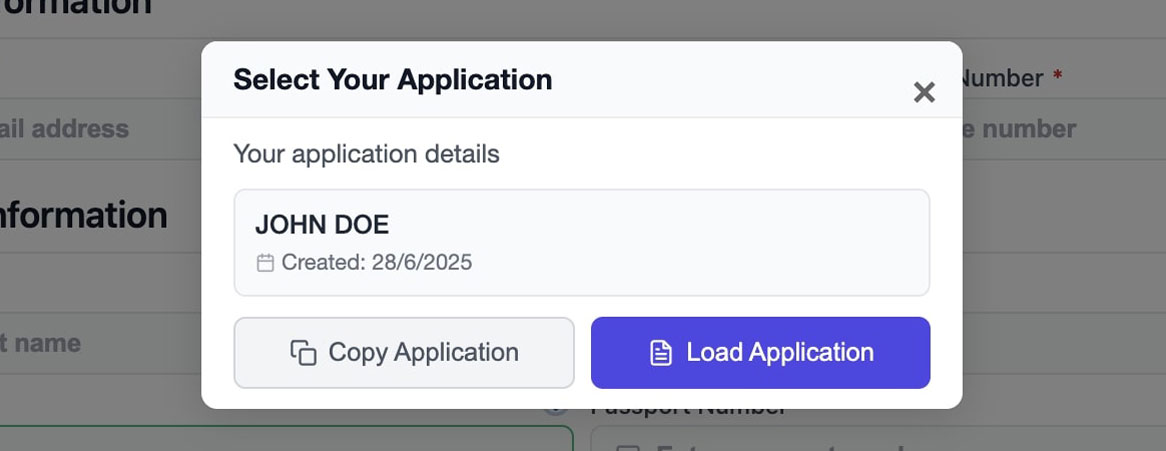
Tangkapan layar saka sistem Agents TDAC, lan dudu sistem imigrasi TDAC resmi. Nuduhake fitur salin kanggo nggunakake maneh rincian aplikasi sadurunge.
Negara-negara sing diumumake minangka Wilayah Terinfeksi Demam Kuning
Wong sing wis lelungan saka utawa liwat negara-negara iki bisa uga diwajibake nampilaké Sertifikat Kesehatan Internasional sing mbuktèkaké vaksinasi Demam Kuning. Siapke sertifikat vaksinasi sampeyan yen berlaku.
Afrika
Angola, Benin, Burkina Faso, Burundi, Cameroon, Central African Republic, Chad, Congo, Congo Republic, Cote d'Ivore, Equatorial Guinea, Ethiopia, Gabon, Gambia, Ghana, Guinea-Bissau, Guinea, Kenya, Liberia, Mali, Mauritania, Niger, Nigeria, Rwanda, Sao Tome & Principe, Senegal, Sierra Leone, Somalia, Sudan, Tanzania, Togo, Uganda
Amerika Selatan
Argentina, Bolivia, Brazil, Colombia, Ecuador, French-Guiana, Guyana, Paraguay, Peru, Suriname, Venezuela
Amerika Tengah & Karibia
Panama, Trinidad and Tobago
Tautan Terkait TDAC Thailand Resmi
Kanggo informasi luwih lengkap lan kanggo ngirim Kartu Kedatangan Digital Thailand sampeyan, mangga kunjungi pranala resmi ing ngisor iki:
- Situs Resmi TDAC - Biro Imigrasi Thailand
- Syarat Sertifikat Kesehatan Internasional - Kementerian Luar Negeri
- 04/04/2025 - ไทยเที่ยวไทย - TATKB
- 04/04/2025 - Pembaruan Negara Tinggal TDAC - Berita TAT
- 31/03/2025 - Posting Facebook Biro Imigrasi Thailand
- 05/03/2025 - Rincian Kementerian babagan Pelaksanaan TDAC
- 24/02/2025 - Pengumuman MNRE babagan TDAC
- 03/02/2025 - Thailand bakal miwiti TM6 online tanggal 1 Mei 2025
- 03/02/2025 - Pengumuman Departemen Hubungan Masyarakat
- 03/02/2025 - Pengumuman Bea Cukai Bandara Chiang Mai
- 31/01/2025 - Pengumuman Pemerintah Thailand
Grup Visa Facebook
Diskusi anyar
Takon Komunitas ThailandTopik-topik iki dijupuk saka server saka komunitas ASK supaya para lelungan bisa enggalé ndeleng diskusi paling anyar sing gegayutan karo THIM lan TDAC babagan implementasiné.
Komentar babagan Thailand Digital Arrival Card (TDAC)
Takon pitakon lan entuk bantuan babagan Thailand Digital Arrival Card (TDAC).
Komentar (1.553)
Klik komentar lan kita bakal njaluk email panjenengan, banjur OTP, banjur jeneng.
Submitted from the taxi to the airport, about four hours before departure, landing this evening. Card was in the mail before we reached the terminal. I was ready to be the warning story.
Don't make that the plan. It worked because the window was already open and the site was up. Do it the day before and be bored instead.
Agreed. I am the bad example that got away with it. PDF is saved.
Mung sawetara menit waé kanggo persetujuan... kowé bisa nindakake wektu kowé teka lan mlaku menyang imigrasi.
Bener, cepet yen sistemé saya, nanging aku luwih milih ora njupuk risiko ana gangguan nalika antri. Nglakoni sadurunge tekan luwih sithik stres kanggo aku.
For the next person doing this tired: passport name, arrival date in Thailand, first hotel, and a PDF you can open without wifi. Everything else in the group chat is optional noise.
And each person their own card. That was the one we got wrong last year.
Yes. One passport, one card. I should have put that first.
Is a photo of the PDF on my camera roll enough, or do they scan a barcode from the official file? I don't want to depend on airport wifi to open a link.
Save the actual PDF. A photo of it is a backup. The officer mostly wants the passport, and you want the file if they ask.
PDF is offline in files. Photo is the backup. Wifi can do what it wants.
Lands 1:40am. I put the date as the day the flight left, because in my head the trip started then. That was the day before. Changed it to the day I actually arrive.
After midnight in Thailand is the next date. The departure morning is a different piece of paper.
Card says the arrival date. I checked it against the ticket's landing time, not the takeoff.
Is the PDF password protected? It opened straight away and now I trust it less, which is not reasonable, but here we are.
It isn't password protected. If your name and the date are right, that is the check. A password would just be another thing to lose.
Name and date are right. I will stop inventing problems.
Aplikasi Thim ora bisa digunakake, apa sing kudu tak lakoni?
Ya, aplikasi THIM kadhangkala bisa glitch. Aku mung ngisi kartu teka TDAC online sadurunge mabur, lancar kanggo aku. Mbok coba kuwi yen aplikasine isih kaganggu?
Matur nuwun, bisa, aku wis entuk PDFku.
Apik! Seneng TDAC card mau mbantu kowe. Muga-muga aplikasi THIM cepet dadi luwih stabil.
mangkat ing Thailand karo TDAC, matur nuwun
Manis, sugeng rawuh ing Thailand! Muga-muga sampeyan bisa betah, apa proses TDAC wis lumaku lancar sakabehe?
Cruise into Laem Chabang. The form's sea option exists. The ship's agent says they 'handle arrival'. I don't know if that means they file my TDAC or they mean the ship's papers.
Ask them whose name is on the card. If they cannot show you your own PDF, file it yourself and pick sea.
They meant the ship's papers. I filed mine. Sea, not air. PDF in the mail.
Card was issued, then I changed hotels again the morning of the flight. Second new PDF arrived. I now have three files named almost the same. The latest timestamp is the one in my pocket.
Rename it. 'FINAL' is a lie. Put the hotel name in the filename.
Renamed with the hotel. The other two are in a folder called old, which is where they can stay.
Four of us. Mine is fine. My brother's has his first and last name swapped. He says the booth will understand. I say the booth will not be in the mood.
Fix it before you fly if the window is still open. 'They will understand' is not a document.
He fixed it. New PDF. I have stopped managing him, which will last until the next form.
We thought my card covered my husband because we booked together. It doesn't. He needs his own before Friday. Writing it here because the booking email made us feel like one person.
Two passports, two cards. The hotel booking can be the same address on both. That is the only part you share.
A TDAC is per traveler. A shared booking does not put a second person on the first card. File his passport on its own card before arrival.
His PDF arrived. Same hotel, his name. We are two people again.
Airline moved me from the 9th to the 11th. Card was already issued for the 9th. I changed the date. New PDF says the 11th. I assume the 9th one is dead.
Use the one that matches the flight you will actually be on. Delete the other from your photos so you don't offer it out of habit.
Deleted. The 11th is the only file on the phone.
Friend says you can show up and do the TDAC at a desk in the airport if you forgot. I would like that to be a backup and not the plan.
Backup, not the plan. File before you fly. A desk, if you find one, is how you spend the time you thought you had for the toilet.
Submit the TDAC before arrival, inside the 3 days if you want it issued and free on the official site. Do not leave it for the immigration hall.
Three hotels. The form took the first and ignored the rest. Bangkok, then Krabi. I put Bangkok. Tell me that is the whole trick.
First place you sleep after arrival. Krabi is not a second TDAC. Keep the booking if you enjoy being prepared.
Bangkok is on the card. Krabi is in my email. I can live with that split.
Flight number is TG421 on the ticket and I typed TG412. One digit. Worth an edit, or will they see the airline and shrug?
Edit it. It's one digit to you and the wrong plane to anyone who looks.
Edited. TG421. I read it off the ticket this time, not out of my head.
THIM would not scan the passport. I did the TDAC website instead. A comment somewhere said that is now the wrong system. I have a PDF. I would like to stop reading comments.
The website is the arrival card. The app is another door to the same card. A PDF with your name is the result. Stop reading.
The TDAC website is still a valid way to file. THIM does not replace it. If you have the card, you have done the arrival card. You do not also need the app.
Phone died after I saved the PDF to the phone and not to mail. No second copy. Status page still shows it. I am downloading again onto a phone that has charge.
Mail a copy to yourself when you have it. A phone is a bad only-copy.
In the mail, on the phone, and on my husband's phone. Three is enough.
Transit in Bangkok, six hours, not entering. Do I need a TDAC to sit in the terminal, or only if I go through immigration?
If you don't enter, you don't do the arrival card. The moment the plan becomes 'I'll clear and eat in the city', you need one.
Staying airside. No card. If the flight dies and they push us in, I'll do it on the spot and complain later.
Aku mabur saka Delhi menyang Chiang Rai lan bali nganggo rute sing padha. Penerbanganku nyambung ing Bangkok. Apa sing kudu aku isi ing rincian teka lan mangkat? Chiang Rai utawa Bangkok?
Aku isi Bangkok dadi panggonan teka/ngumbara amarga pancen iku panggonan kowe mlebu lan metu saka Thailand, sanajan tujuan pungkasanmu iku Chiang Rai. Kuwi bisa digunakake apik kanggo aku!
Purpose of visit. Holiday. I am also visiting a friend. I picked tourism. I did not write a paragraph about the friend.
Tourism covers a friend. The paragraph is how you talk yourself into the wrong box.
Tourism stayed. Friend knows I'm coming. The form does not need the story.
Passport has a middle name. I used the name I go by. The PDF looks neat and it is not the passport. How much does the booth care?
They care. Match the passport, middle name included. Edit it now if you are still inside the window. A neat wrong name is still wrong.
Edited. New PDF has the middle name. I liked the short one better. The passport does not.
Kita dudu situs web utawa sumber daya pemerintah. Kita berusaha kanggo nyedhiyakake informasi sing akurat lan nawakake bantuan kanggo para pelancong.